More powerful multi-agent workflows: amux v0.4
Running multiple agents in parallel has been pretty addicting as I've been working on amux, but I wanted to force them to follow my preferred workflow. I wanted to make it repeatable and tweakable over time so I can more closely guide how agents get work done without needing to always reply 'No, do this instead' to an Agent's plan.
# amux is an agent multiplexer for your terminal.
# run parallel containerized code and claw agents!
curl -s https://prettysmart.dev/install/amux.sh | sh
Long agent runs from huge prompts were pissing me off
The longer the task you hand to an agent, the more likely it is to go sideways somewhere in the middle. You either split the work into many small items (and babysit each one), or hand over a big spec and hope it stays on track. Neither was quite working for me.
What I actually wanted was a way to break a complex task into phases — plan, implement, tests, docs, review, push, etc. — and have the agent run each phase separately, pausing between them so they are forced to break the work into more achievable pieces and give me chances to check in. Not one huge prompt, not successive random prompts I have to type out. A pipeline I can define once and reuse.
Amux v0.4 can do that with --workflow.
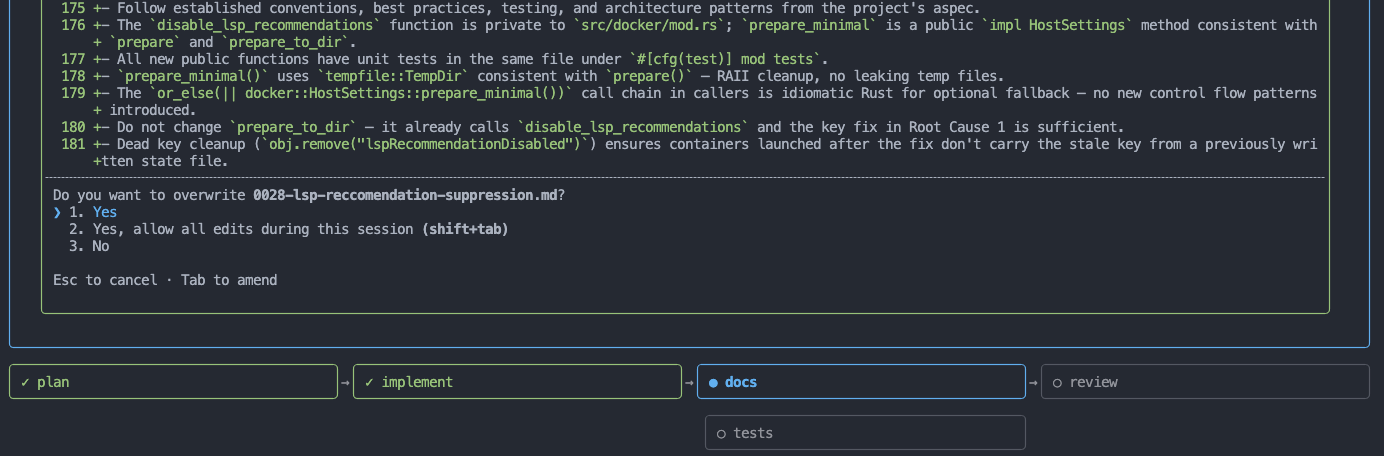
Multi-step workflows
A workflow is a plain Markdown file you write once:
## Step: plan
Prompt: Read the work item and produce an implementation plan.
{{work_item_content}}

## Step: implement
Depends-on: plan
Prompt: Implement work item {{work_item_number}} according to the plan.

## Step: review
Depends-on: implement
Prompt: Review the changes for security, correctness, completeness, and style.
Run it:
amux implement 0042 --workflow ./aspec/workflows/implement-feature.md
amux parses the file into a DAG, runs each step in its own container (or successively in the same container if you wish), and pauses after each one. The TUI shows a live workflow overview so you always know where you are. State is saved to disk, so you can quit and resume later without losing progress.
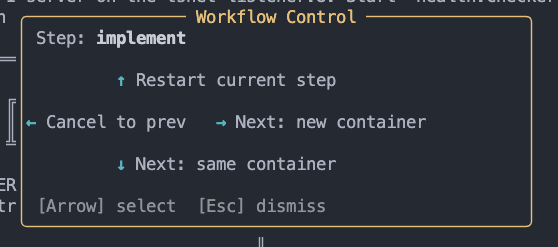
When the agent is done working on its current step, amux auto-opens the workflow control board — a popup where you can advance, restart, skip, or cancel without waiting. You can also open it manually with Ctrl+W at any time.
Worktree isolation
The other thing you need to really embrace parallel agents: a way to let an agent loose in its own git-isolated sandbox. So amux v0.4 adds support for Git worktrees:
amux implement 0042 --worktree
This checks out an isolated Git worktree under ~/.amux/worktrees/ and mounts that for the agent instead of your repo root. When the agent finishes, amux prompts you:
Worktree branch amux/work-item-0042 is ready. Merge into current branch? [y/n/s]
Merge it, discard it, or keep the branch for manual review — your choice. If you combine --worktree with --workflow, every step in the workflow runs in the same isolated worktree, so the full pipeline produces one coherent diff at the end.
For agents that need to push branches or clone private repos, add the new --mount-ssh to give the container access to your host SSH keys.
Commit signing
One annoyance I ran into while building this: if you have GPG commit signing enabled, the git commit that happens during the worktree merge flow would steal the terminal and destroy the TUI. The passphrase prompt (pinentry, ssh-askpass, etc.) opens /dev/tty directly, which fights with amux's fullscreen TUI.
The fix is the same pattern lazygit and vim use: suspend the TUI before the command, restore it after. That's what amux does now — regardless of whether you use GPG, SSH-format, or S/MIME signing.
Please give v0.4 a try and let me know how it goes! amux v0.5, alog v0.2, and another adjacent project are just around the corner.
Source and issues at github.com/prettysmartdev/amux. More at prettysmart.dev. Feedback, bug reports, and contributions are welcome.