Code agents that actually get things done while you're asleep: amux v0.5
A few days ago was the first time I was actually able to kick off a complicated agent-based workflow before bed and have it completely finished when I got up the next morning. It's really quite impressive what these tools can accomplish these days. Using amux workflows and its new --yolo mode plus Apple Containers is what made it possible. I now do it almost every night.
I've been using amux daily to build amux (and oasis - more details soon!). The one wet blanket was wanting to hand off a long task and walk away, but having to come back every few minutes to answer a permission prompt or advance a workflow step. v0.5 gives you the option to--yolo and let both agents themselves and the amux workflows they're running in keep moving without intervention.
Oh, and Apple Containers rock. They're now my default. Docker Desktop feels slow by comparison. amux v0.5 supports it. I also spent a bunch of time making sure that all of the supported agents (plus two new ones; gemini and maki) work just as well as Claude, including auto-auth, settings passthrough, and the Dockerfile.dev refresh agent (amux ready --refresh). If there's another agent you want supported, please file an issue!
# install or upgrade
curl -s https://prettysmart.dev/install/amux.sh | sh
Walking away for real with --yolo
The new --yolo flag tells your agent to skip all permission prompts and proceed autonomously. Every agent gets the right flag for its CLI: --dangerously-skip-permissions for Claude, --full-auto for Codex, and --yolo for Maki and Gemini (they named it the same thing — good taste). I feel comfortable letting agents roam since they're sandboxed in a container (or microVM, if you use Apple Container), and amux automatically isolates them to a git worktree.
amux implement 0045 --yolo --workflow ./aspec/workflows/implement-feature.md
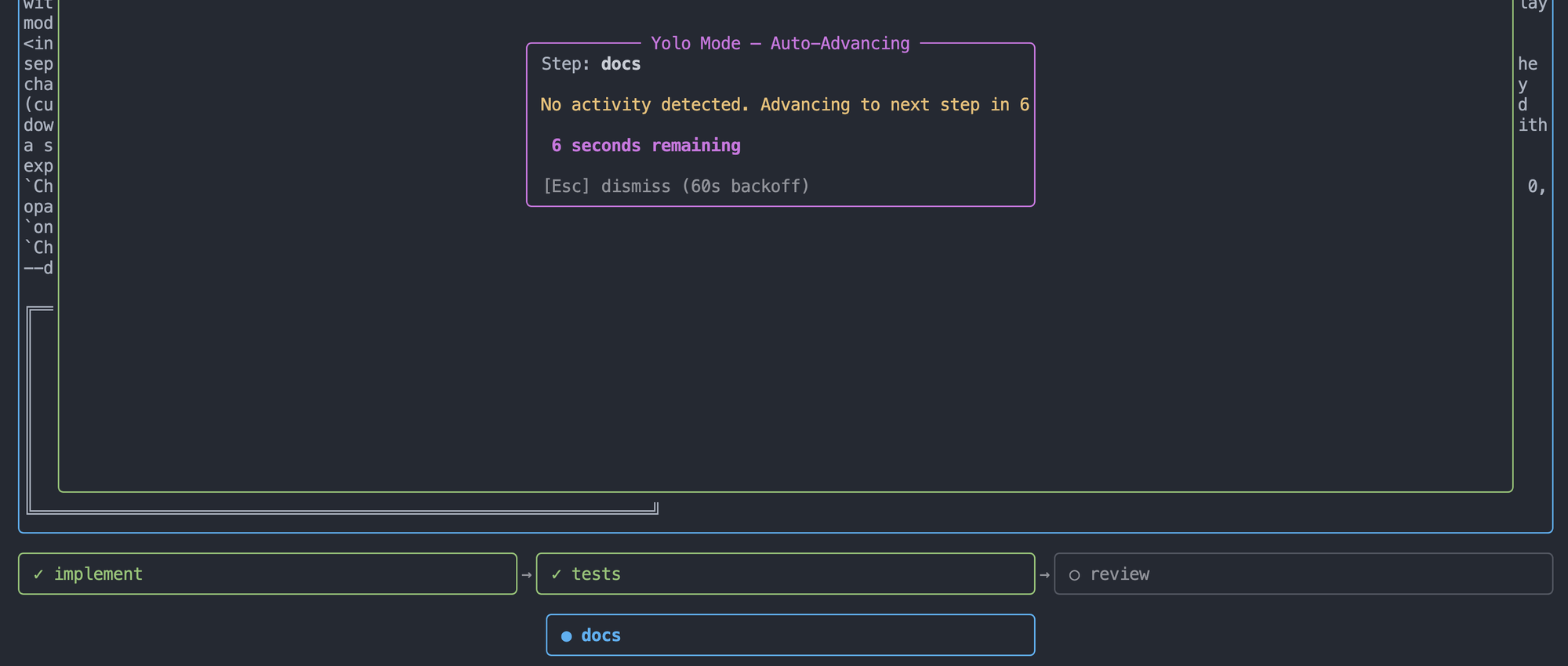
When you combine --yolo with --workflow, amux really starts to rip through work items. Since agents generally don't get stuck in yolo mode, as soon as they stop their work, a new countdown dialog opens in the TUI and then automatically advances the amux workflow to the next step after 60 seconds. This means you can hand amux a complex work item and a multi-stage workflow, and your agents will truly get it all done without any help.
If you want autonomy without fully disabling prompts, --auto is a middle ground: It uses Claude's new auto mode, and otherwise enables writes for other agents (but not everything). When combined with --workflow it also implies --worktree, but the workflow won't auto-advance — you still advance manually.
You can also add yoloDisallowedTools to your amux config to permanently block specific tools even in yolo/auto mode:
{ "yoloDisallowedTools": ["Bash", "Computer"] }
Apple Containers runtime (macOS 26+)
Docker Desktop on Mac has always felt more bloated than it needs to be (especially because of the VM it requires you run). macOS 26 supports the Apple container CLI which runs OCI containers in micro VMs without a big chunky VM or a heavy daemon. amux now supports it.
Global config (~/.amux/config.json):
{ "runtime": "apple-containers" }
That's all you need to do (though I do reccomend reviewing the default Apple Container resource allocations using container system property list, the defaults are scrawny). Your project's Dockerfile.dev, workflow files, and every other amux feature works exactly the same — amux maps all operations to the right container runtime behind the scenes. amux ready validates the runtime and ensures it's ready before you start your work.
Two new agents: Maki and Gemini
Maki is an indie upstart agent (also built with Rust and Ratatui!), and Gemini is one of the big kids on the block. They're both now supported in every amux path: init, ready, chat, implement, --plan, --auto, --yolo, the works.
# When you set up amux in your repo:
amux init --agent maki
amux init --agent gemini
All of the agents support API keys in some fashion for auth, so if you don't have them running on your host or don't want to use amux auto-auth, you can now use environment variables. A new envPassthrough config field handles this: list the variable names you want forwarded from your shell into the container, and amux reads and injects them at launch time. The values are masked in every displayed docker run command.
Global config (~/.amux/config.json) or Repo config ($GITROOT/.amux/config.json):
{
  "envPassthrough": ["GEMINI_API_KEY", "ANTHROPIC_API_KEY"]
}
It's an explicit allowlist — amux won't forward your whole environment by design. You name the variables you want in the container, nothing else gets through.
Since Gemini does supports oAuth tokens, amux also supports auto-auth for Gemini (OAuth tokens from your host get mounted into Gemini amux containers). amux creates a temporary copy of the ~/.gemini directory and mounts it into the container, so if you've already authenticated gemini locally you don't need to log in again inside the container.
Please give amux v0.5 a try and send me your feedback. I really do appreciate it!
Source and issues at github.com/prettysmartdev/amux. More at prettysmart.dev. Feedback, bug reports, and contributions are welcome.