amux 0.3: Faster specs, better multiplayer visibility
I worked over the weekend to get the core workflow that was introduced in v0.2 feeling smoother: write spec (now even faster), kick off work, validate results, update tests and docs, commit and push. When you are repeating this workflow interleaved across several agents working at the same time, any savings you can get from less babysitting and syncing human-agent context, the less headache you'll have moving between them.
One of the most underappreciated parts of a good code agent workflow is what happens before the agent gets to work. If the spec you provide is vague, the agent will fill in the blanks itself — sometimes well, often not. And after the agent finishes, the spec is likely to become stale if the implementation diverged from the plan, edge cases got resolved differently, or you change your mind about small details. You end up with documented intent that no longer matches the code. This release helps close that gap. Getting accurate specs down on paper now takes less effort (making it more likely it'll get done well), andamux will help you keep your specs in line with reality after a few back-and-forth chats with the agent about what they did wrong.
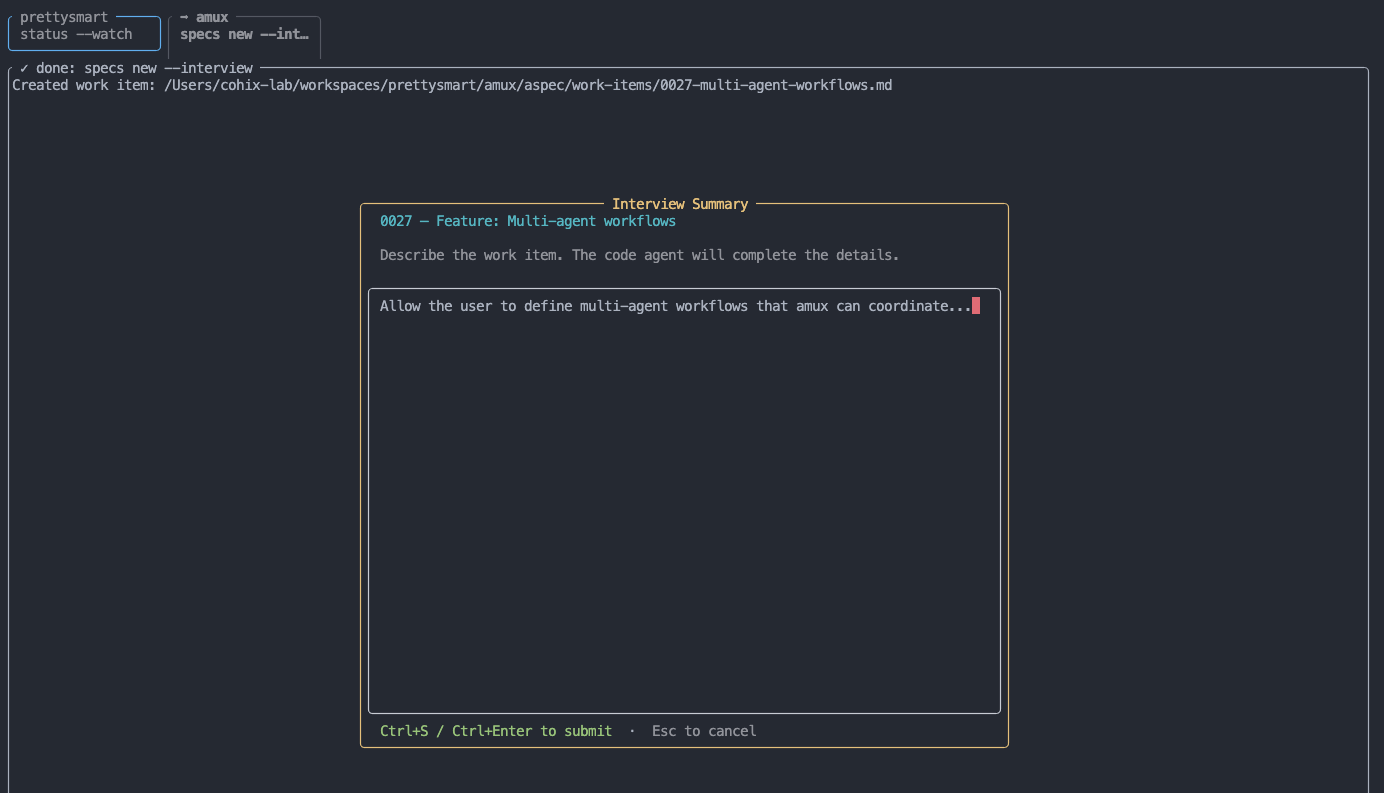
Specs workflow, but faster
The amux specs subcommands added in v0.3 consolidate and expand its spec authoring tools:
amux specs new               # same as before
amux specs new --interview   # new: agent helps you complete the spec based on a short description
amux specs amend 0025        # new: agent helps you update spec to match how it was implemented
--interview is the one I've been wanting for a while. When you need to create a new work item, amux will run your agent based on a short description you provide and expand it into a first draft of the spec — what problem you're solving, what it should do in edge cases, what the constraints are. It fills in the spec Markdown so you can refine it. The result is a much more complete work item without having to write it from scratch. I've found it's particularly useful when I know roughly what I want but haven't thought through the details yet — the agent surfaces things I would have left blank or forgotten. The first draft isn't always exactly what you want, but editing a good starting point is much faster than starting from scratch.
specs amend is at the other end of the workflow - it runs your agent against a completed work item after the implementation is verified and tested. It reads the spec and the current state of the codebase and updates the spec to accurately reflect what was built. Not every work item warrants this, but for anything that will have ongoing maintenance or gets referenced in future specs, keeping them accurate is worth the two minutes it takes. This is especially useful when you need to go back-and-forth with your agent after initial implementation to iron out small bugs or edge cases.
amux status
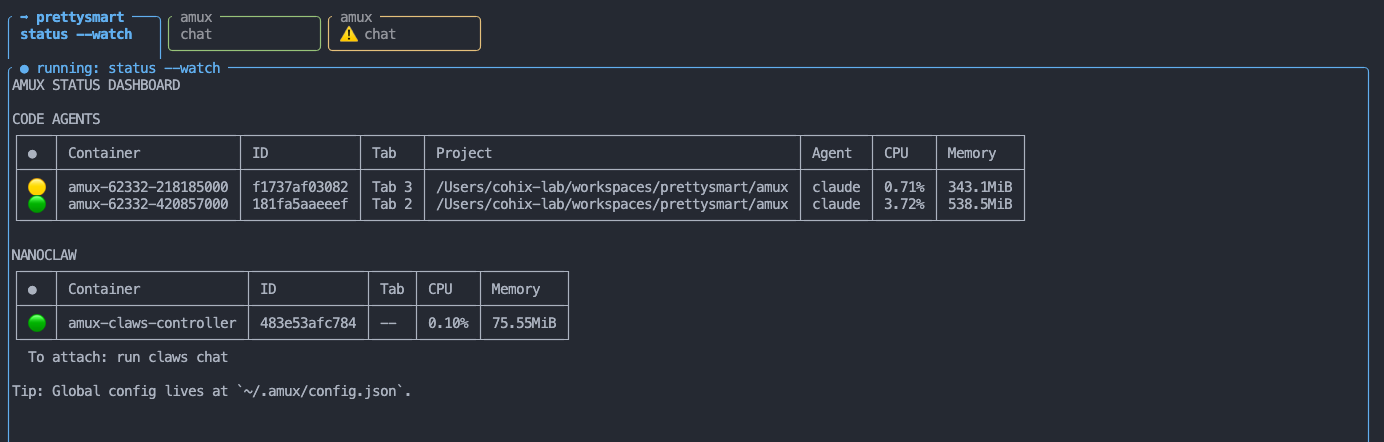
When you have several agents running in parallel, the TUI gives you their basic status at a glance. But sometimes you'll want a full overview with more detail, or you'll want to keep track of agents running across multiple terminal windows. The new amux dashboard shows you a full account of all code and claw agents running on your machine, across all amux sessions.
amux status          # one-shot table of all running agents
amux status --watch  # same, refreshing every 3 seconds
It shows every active code agent and all nanoclaw-managed containers: CPU, memory, project path, agent name, and runtime. It keeps things simple with just the information you need to know if things are humming along or something needs attention. It'll even reflect any 'stuck agents' with the status bubble. More to come here, but this is a good start...
Active tab visibility
Small thing, but it bugged me: in the tab bar, it wasn't always obvious which tab was active. The active tab now visually "opens" into the content area, so there's no ambiguity about where you are. Especially useful when you have 6 tabs open and you glance back at the terminal.
Available now!
Please give v0.3 a try and give me your feedback! The screenshot above gives a hint at where I want to take this next, and there's also a release of alog waiting in the wings... more to come 🙂
The project is at github.com/prettysmartdev/amux. Issues and contributions are most welcome!